


DTF Gang Sheet
7,50 € + VAT
Automatically combine multiple different graphics onto a single sheet to create your own DTF Gang Sheet. Simply upload your files, specify sizes and quantities, and our designer will optimally arrange the DTF transfers on the film. Order transfers on a roll or cut into individual pieces.
Estimated delivery by 09 Nov 2026
DTF by the meter with automatic imposition

DTF Gang Sheet Transfers – multiple designs, one print.
Preparing multiple DTF prints does not have to mean manually positioning each graphic on the sheet. If you have a dozen, several dozen, or even more different designs, simply preparing the production file can take a considerable amount of time. DTF gang sheet transfers allow this stage to be largely automated.
You upload your graphics, specify their size and the number of copies needed, and the system automatically arranges them on the sheet. The layout is optimized to make the most of the available space, so you don’t have to manually move, rotate, and fit each pattern. It is a combination of automation, time savings, and efficient use of DTF film.
No more manually arranging dozens of DTF graphics.
For a few projects, manually preparing the sheet might not be a major issue. The situation changes, however, when the number of images begins to increase. Imagine preparing a sheet containing 30 different designs in several sizes. Each project requires proper setup, appropriate spacing, and dimension checks, as well as ensuring that the available space is utilized as efficiently as possible. Performing such work manually can be time-consuming and require numerous corrections.
In the case of DTF gang sheets, a large part of the work is done for you: the automatic arrangement of graphics. The system analyzes the prepared patterns and arranges them on the sheet without the need to manually position each element.
Automatic nesting that helps save film.
Automation is not just about convenience. The way graphics are arranged has a direct impact on the amount of film required. The better the sheet area is utilized, the less unused space remains. Therefore, automatic pattern layout has been designed to efficiently utilize the available DTF film area.
The graphics are arranged as close together as possible, while maintaining the spacing required for the subsequent separation and application of the transfers. In practice, this means less wasted space and more organized production material. However, you don’t have to manually search for the best setting every time.
You decide on the designs, and DTF Builder handles their layout.
This is one of the most important advantages of this method of preparing DTF gang sheets. You don’t have to be a graphic designer or a space optimization specialist. You select the designs you want to print, specify the required sizes and quantities, and then let the system prepare the layout. This allows you to focus on what you want to print, rather than figuring out the best way to arrange dozens of graphics on the DTF film. This is particularly important in regular production, where similar tasks are repeated every day.
From image files to a finished DTF roll.
The entire process can be broken down into a few simple stages. First, you prepare your graphics. Next, you specify their sizes and the number of copies. The system automatically arranges designs on the roll of film, utilizing the available surface area as efficiently as possible. You receive a ready-made layout that can be used to produce DTF transfers. You don’t have to manually move every graphic, rotate designs, or repeatedly adjust their positioning. Automation handles the most time-consuming part of preparing a DTF gang sheet.
Why is the automatic layout of DTF gang sheets so important?
In DTF printing, it is not just the quality of the print itself that matters. As the number of projects increases, the organization of the production process becomes equally important. If a dozen or so sheets have to be prepared manually every day, even simple tasks begin to take up a significant portion of working time. Automated placement of DTF gang sheet graphics allows you to turn this repetitive process into a much faster task. Less clicking. Less manual dragging. Less wasted space. More time for production.
More DTF transfers doesn't have to mean more work.
A DTF gang sheet works particularly well for orders involving multiple different designs. It could be a clothing collection, a client-specific series, a set of logos, corporate apparel, products for an event, or short runs of various designs. Each project can have a different size and a different number of copies.
DTF Builder uses this information to prepare a combined layout of print files. This allows you to prepare a single optimized sheet containing the entire set of DTF transfers, instead of creating multiple individual production files.
Gang Sheet DTF transfers - digital cut into single pieces.
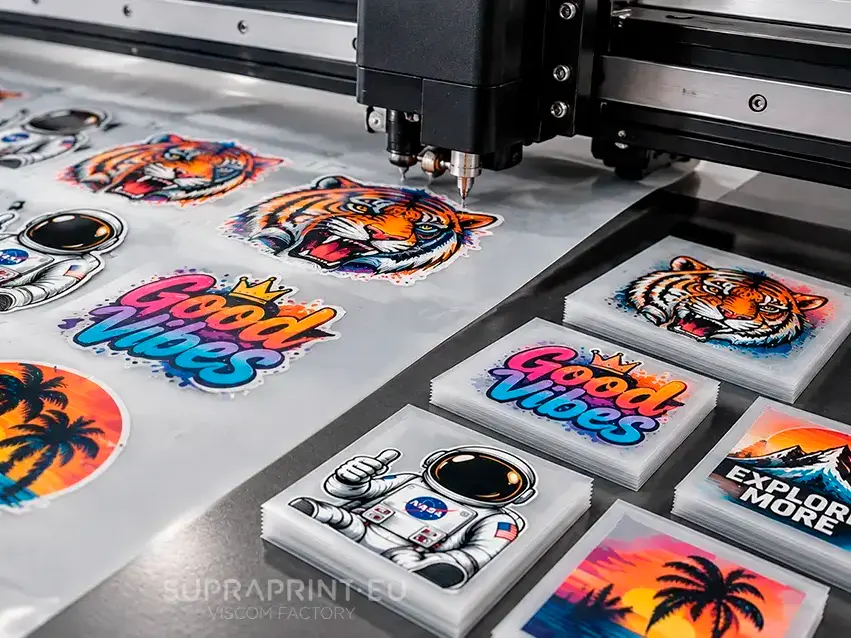
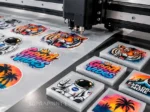
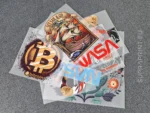
When ordering DTF transfers, you don’t have to limit yourself to continuous-roll prints that require manual cutting after delivery. At SUPRAPRINT, you can order DTF transfers that are digitally cut into individual pieces. Each print is automatically cut out, providing you with ready-to-apply graphics that do not need to be manually separated from the rest of the film.
Automatically cut DTF transfers facilitate precise positioning and application onto garments. This is particularly useful for producing T-shirts, sweatshirts, and other textiles where consistency, accurate graphic placement, and efficient high-volume production are key. Digital cutting reduces transfer preparation time and streamlines the heat-application process.
Time savings that matter in DTF roll-to-roll production.
In the case of a single order, the difference may seem small. However, if you prepare transfers regularly, every minute spent manually positioning graphics starts to matter. Let’s assume that manually preparing one sheet takes 10–15 minutes. With a dozen or so orders a day, this quickly adds up to several hours of work.
Automatic image placement allows this stage to be significantly streamlined. Less manual work means more time for production, customer service, and fulfilling subsequent orders. That is precisely why automation is particularly valuable for companies that perform DTF transfers regularly, rather than just occasionally.
DTF Gang Sheet for small and large runs.
You don’t need a massive printing facility to take advantage of automatic layout. The solution also works well for small production runs, such as when you are preparing several different designs for a single collection. At the same time, with a larger number of projects, the benefits become even more apparent. The more graphics that need to be positioned, the more potential combinations would have to be checked manually. Automation takes over this tedious part of the work, allowing for a faster transition from finished designs to production-ready material.
Make use of every centimeter of available space on the DTF film.
A well-prepared DTF gang sheet should not only be convenient to produce but also efficiently planned in terms of material usage. The empty space between graphics is a natural part of the process, but unnecessarily large gaps or the random placement of designs can increase the required sheet length. Automatic stacking helps minimize such situations.
The graphics are arranged to optimize the available space, allowing you to make better use of the DTF film. With a higher volume of orders, such optimization can have a significant impact on production costs.
How to prepare files for a DTF gang sheet?
How do you heat-press our DTF transfers?
DTF Gang Sheet Transfers – designed for more convenient production.
DTF transfers are the future of textile personalization. Thanks to the option of ordering DTF transfers by the linear meter, the production of printed apparel becomes accessible, fast, and highly efficient. Take advantage of the services of a professional digital textile printing company and discover how simple it can be to create your own designs on T-shirts, sweatshirts, and other products. Order DTF transfers online today and transfer your design onto fabric with perfect quality!